
Blog · Kitchen Equipment
Combi Oven Error Codes Explained
Every article gets a featured image made for its topic, with your title, colours and logo. It's the same tool that designed the thumbnails for all 250 articles in our Shopify case study.
The case study
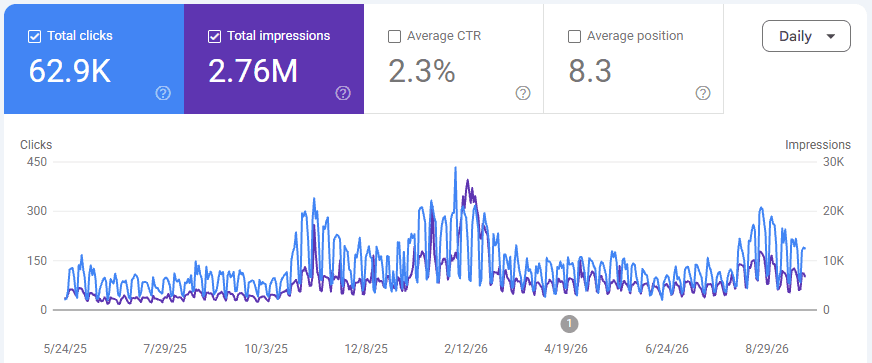
A commercial kitchen parts store on Shopify. Every article we published for them went out with a thumbnail designed in EnhanceMySEO. May 2025 – Sep 2026.
The same layout, brand colour, bold title and logo on every article. Across the blog index, in Google and in shared links, readers learned to spot the store's articles at a glance.
Blog · Kitchen Equipment
Combi Oven Error Codes Explained
Blog · Footwear
Best Running Shoes For Flat Feet
Blog · Pet Supplies
How To Choose A Dog Harness
Blog · Skincare
Retinol vs Vitamin C: Which First?
Example thumbnails. Real ones use an AI photo made for each article.
Why it matters
The featured image is the first thing people see in Google Discover, image search, your blog index and every shared link.
Google Discover and rich results favour large, high-quality images. Google recommends at least 1200px wide; every thumbnail here is 1600 × 900.
Each featured image goes up with the article title as its alt text, so it can surface in Google Images as well as web search.
Your featured image becomes the preview card when an article is shared on social, in chat apps and in newsletters. A blank card gets scrolled past.
Your colour, your logo and the same layout on every post. Readers recognise your articles in a feed before they read the name.
Styles
Pick one for the whole blog or mix them per article. Every layout uses your colour and logo.
How it works
Choose any article you wrote with us or one already on your Shopify blog. Or switch thumbnails on and every new article gets one automatically.
We generate a photo made for that topic, then lay it out with your title, brand colour and logo in the style you choose.
Tweak the text, colour or photo crop if you like, then set it as the featured image. On Shopify it goes straight onto the article.
Features
No stock photo hunting. Each thumbnail gets an AI photo made for what the article is about.
Your colours and logo come from your brand profile, so every thumbnail matches without a designer.
Including the Parts Plus format used across the case study blog. Switch styles per article or set a default.
Change the headline, panel side, edge, text size, photo zoom and focus. Reopen and edit any time.
Set as the article’s featured image on your Shopify blog, with alt text, in one click.
Turn thumbnails on in an automation and each scheduled article publishes with its own image.
Plans
Kickstart includes 50 thumbnail photos a month and SEO Takeover includes 180, alongside your articles. Need more? 20 extra photos are $10 and never expire.
See the output on your own products before you pay anything.
Free forever, no card needed
For smaller Shopify stores starting their SEO journey.
Billed $276 yearly
Why upgrade? Two articles shows you the quality. Consistency is what moves traffic: 25 a month is enough to publish several times a week, with bulk generation across your catalog.
For growing stores that want publishing to run itself.
Billed $948 yearly
Why upgrade? Scheduling unlocks hands-free publishing: set it daily or weekly and articles generate and push to Shopify without you. 90 a month covers a large catalog in months, not years.
For businesses that want SEO handled end to end.
Unlimited platform access included
Why go managed? A dedicated strategist runs everything — technical fixes, keyword strategy, product optimization and the blog — and reviews results with you every month.
FAQ
It designs the featured image for a blog article for you. EnhanceMySEO generates a photo for the article’s topic, then lays it out with the title, your brand colour and your logo, ready to use as the article’s featured image.
1600 × 900 pixels, a 16:9 ratio. That is wider than the 1200px Google recommends for large image previews, and it crops well into blog grids and social share cards.
Yes. Open it in the thumbnail studio to change the headline, layout, colours, panel side, edge style, text size, logo and how the photo is cropped. The design is saved, so you can reopen it later.
Yes. Connect your store and you can make thumbnails for articles already on your Shopify blog, then set them as the featured image in one click. Articles written with EnhanceMySEO can get theirs automatically.
Kickstart includes 50 thumbnail photos a month and SEO Takeover includes 180. If you run out, you can buy 20 extra photos for $10; extras never expire. Editing a thumbnail you already made doesn’t use a photo.
The free plan includes two articles a month so you can see the writing quality. Thumbnails come with the paid plans, and you can try every layout in the preview on this page first.
Indirectly, and it adds up. A good featured image makes an article eligible for large previews in Google Discover, can rank in Google Images through its alt text, and gets more clicks when the article is shared. It won’t rank a weak article on its own.
The same format behind 2.76M impressions, on your blog, in your colours, without opening a design tool.
Results come from one client's store and vary by niche, competition and publishing pace.